Microsoft announced the release of Internet Explorer 8 Beta2. Its more of a combination of features of Safari and Firefox, Some of the features which the beta version has is the Inpage search which is more like the safari inpage search. The new explorer has a DOM inspector, a JavaScript profiler, a color picker and ruler, options to outline objects, disable CSS and validate web pages. The New IE is developed on the new standards of the world wide web.
The new IE concentrates on AJAX enhancements,CSS and Support for data URI and one more feature that is added in IE 8 is that we dont need to view the source of the same old notepad software where the syntax are not highlighted, however the new browser has a inliner editor which displays the HTML source code with all the highlights of syntax.
Interms of security where Micorosoft always has a concern the browsing history,cookies,form data,usernam,password can be made not to be stored in the browser, It also blocks adult sites this feature is called Inprivate Browsing This can be set by navigating to Safety -> InPrivate browsing.
Finally Google maps and Gmail works fine in IE,
I'm sure lot of people will start using IE more often now, more of open source features is really drawing people to use IE, All the best to the microsoft team and hope to see IE 8 to be another successful product from Microsoft.
Sunday, August 31, 2008

Monkeygrease says now Java's cool too

Monkeygrease helps in:
- Changing the look and feel of a web application
- Adding DHTML/AJAX features/effects on your site
- Adding WYSIWYG editing to any textarea field on your site
- Enhance pages by contextually adding content from external providers
- Fix usability issues on any page
How do we get this working...
1. You must have Apache Tomcat 5.x. A web application whose WEB-INF directory is accessible.
2. You can download monkeygrease from here (This will include the jars, monkeygrease.xml file containing rules)
3. Installation
- 1.Extract the monkeygrease_xxx.zip file you downloaded
- 2.Upload the monkeygrease.jar file to your web application’s WEB-INF/lib directory. Depending on your application server, you might be able to do this through an administration console, however, if you have access to the web application’s directory, it’s probably easier to do it manually.
- 3.Upload the monkeygrease.xml file to your web application’s WEB-INF directory.
- 4.Modify your web application’s web.xml file and add the following lines that define rules. Click here to take the snippet of code. mentioned under point 4 in the linked page.
4. Restart your app server in order to enable the filter.
5. Output of a simple html file before and after can be seen as illustrated in view-example
Hope this start will take Monkeygrease much further...
Wednesday, August 27, 2008
Google Last Login Activity + Google Suggest
One of the features that is been available in Gmail for sometime now which is unnoticed by a lot of gmail users is the gmail last login activity. The gmail last login activity appears in the bottom of the gmail

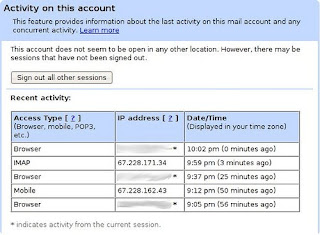
Now you can signout the various other sessions that are open by clicking on the signout all other sessions.
It is also useful to know if somebody else is accessing your gmail id by validating the location of the ipaddress from where you mail is being accessed.
Be secured by using the feature and make sure you logoff whenever you move out.. Play safe, the bad guy is at the back of you !!!
Google officially announced that Google suggest, a product which has been in the labs for a long time will be available by default in the Google search engine from now on. For those of you who are not aware of the Google suggest here is what Google looks like with Google suggest.
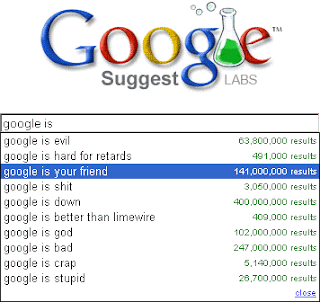
So from now on you can get the best of search experience from Google. Great move Google guys, Kudos to you !!!!

The above detail shows all the locations where your gmail id is active and the ipaddress of those locations also on clicking the details link you get the following page which summarizes the same.

Now you can signout the various other sessions that are open by clicking on the signout all other sessions.
It is also useful to know if somebody else is accessing your gmail id by validating the location of the ipaddress from where you mail is being accessed.
Be secured by using the feature and make sure you logoff whenever you move out.. Play safe, the bad guy is at the back of you !!!
Google officially announced that Google suggest, a product which has been in the labs for a long time will be available by default in the Google search engine from now on. For those of you who are not aware of the Google suggest here is what Google looks like with Google suggest.

So from now on you can get the best of search experience from Google. Great move Google guys, Kudos to you !!!!
Monday, August 25, 2008
Oracle Tip
There are lot of interesting stuffs that can be done using the data dictionary tables in oracle. There are lot of data dictionary available in oracle. Some of them are
user_tables,
user_tab_cols
user_views
The different data dictionaries that are available in oracle can be viewed by querying ALL_VIEWS
select * from all_views ;
Now one of the data dictionary or one of the most powerful and useful one in oracle is dba_users. This data dictionary gives you the details about the database users that are available for a particular database. Now if suppose you want to access the database using a specific userid and you dont have the password of the user,however have the privilige to do things in the database then you can try to use the following stuff
SQL > select username,password from dba_users where username = 'SCOTT'
USERNAME PASSWORD
---------------------------
SCOTT F894844C34402B677
now alter the user to specify your custom password
SQL > Alter user scott identified by mypassword
Then login to the user scott using the password specified by you now and start working.
Once you have done with the work restore the old password by using the undocumented thing called by value
SQL> Alter user scott identified by values ' F894844C34402B677'
So that the password is restored to its originial value.
Hope the tip is helpful in certain aspects for the database administrators or it might be a way to provide an insight to the ways security breaches can be made if priviliges are available for database users.
SQL> select username,password from dba_users where username='SCOTT';
USERNAME PASSWORD
-------- ----------------
SCOTT F894844C34402B677
user_tables,
user_tab_cols
user_views
The different data dictionaries that are available in oracle can be viewed by querying ALL_VIEWS
select * from all_views ;
Now one of the data dictionary or one of the most powerful and useful one in oracle is dba_users. This data dictionary gives you the details about the database users that are available for a particular database. Now if suppose you want to access the database using a specific userid and you dont have the password of the user,however have the privilige to do things in the database then you can try to use the following stuff
SQL > select username,password from dba_users where username = 'SCOTT'
USERNAME PASSWORD
---------------------------
SCOTT F894844C34402B677
now alter the user to specify your custom password
SQL > Alter user scott identified by mypassword
Then login to the user scott using the password specified by you now and start working.
Once you have done with the work restore the old password by using the undocumented thing called by value
SQL> Alter user scott identified by values ' F894844C34402B677'
So that the password is restored to its originial value.
Hope the tip is helpful in certain aspects for the database administrators or it might be a way to provide an insight to the ways security breaches can be made if priviliges are available for database users.
SQL> select username,password from dba_users where username='SCOTT';
USERNAME PASSWORD
-------- ----------------
SCOTT F894844C34402B677
Sunday, August 24, 2008
Greasemonkey !!!
FireFox - Greasemonkey
Greasmonkey is a firefox extension that allows you to write scripts that alter the webpages you visit
Some of the things which we can make using Greasemonkey is :
1. Make websites more readable.
2. Fix rendering bugs which the owner is not aware of.
3. Alter pages to make them work with other technologies like the speech based.
4. Retrieve data from multiple site and make them interconnected.
How to use Greasemonkey ??
To Use Greasemonkey, You need to install the Greasemonkey add-on unto yout Firefox browser and then we have to install the user script by choosing from the Tools > Install user script. The Greasemonkey is just an add-on and doesnt make any difference until the user scripts are installed. A repository of user scripts available. A user script usually ends with .user.js.
Let see how to use a sample greasemonkey script. As usuall its the Hello World script.
Example
The user script is named as helloworld.user.js
// Hello World! example user script
// version 0.1 BETA!
// 2005−04−22
// Copyright (c) 2005, Mark Pilgrim
// Released under the GPL license
// http://www.gnu.org/copyleft/gpl.html
//
// −−−−−−−−−−−−−−−−−−−−−−−−−−−−−−−−−−−−−−−−−−−−−−−−−−−−−−−−−−−−−−−−−−−−
//
// This is a Greasemonkey user script.
//
// To install, you need Greasemonkey: http://greasemonkey.mozdev.org/
// Then restart Firefox and revisit this script.
// Under Tools, there will be a new menu item to "Install User Script".
// Accept the default configuration and install.
//
// To uninstall, go to Tools/Manage User Scripts,
// select "Hello World", and click Uninstall.
//
// −−−−−−−−−−−−−−−−−−−−−−−−−−−−−−−−−−−−−−−−−−−−−−−−−−−−−−−−−−−−−−−−−−−−
//
// ==UserScript==
// @name Hello World
// @namespace http://diveintogreasemonkey.org/download/
// @description example script to alert "Hello world!" on every page
// @include *
// @exclude http://diveintogreasemonkey.org/*
// @exclude http://www.diveintogreasemonkey.org/*
// ==/UserScript==
alert('Hello world!');
As you read the script you might know what the script means, no install this script by using the install user script option and choosing helloworld.user.js
Once installed, whenever you move to a new page an alert will be made saying Hello World.
Greasemonkey can change the way you browse once installed and used. Hope you have got a insight on what greasemonkey is all about.
Happy browsing and cheers to Greasemonkey !!!
Greasmonkey is a firefox extension that allows you to write scripts that alter the webpages you visit
Some of the things which we can make using Greasemonkey is :
1. Make websites more readable.
2. Fix rendering bugs which the owner is not aware of.
3. Alter pages to make them work with other technologies like the speech based.
4. Retrieve data from multiple site and make them interconnected.
How to use Greasemonkey ??
To Use Greasemonkey, You need to install the Greasemonkey add-on unto yout Firefox browser and then we have to install the user script by choosing from the Tools > Install user script. The Greasemonkey is just an add-on and doesnt make any difference until the user scripts are installed. A repository of user scripts available. A user script usually ends with .user.js.
Let see how to use a sample greasemonkey script. As usuall its the Hello World script.
Example
The user script is named as helloworld.user.js
// Hello World! example user script
// version 0.1 BETA!
// 2005−04−22
// Copyright (c) 2005, Mark Pilgrim
// Released under the GPL license
// http://www.gnu.org/copyleft/gpl.html
//
// −−−−−−−−−−−−−−−−−−−−−−−−−−−−−−−−−−−−−−−−−−−−−−−−−−−−−−−−−−−−−−−−−−−−
//
// This is a Greasemonkey user script.
//
// To install, you need Greasemonkey: http://greasemonkey.mozdev.org/
// Then restart Firefox and revisit this script.
// Under Tools, there will be a new menu item to "Install User Script".
// Accept the default configuration and install.
//
// To uninstall, go to Tools/Manage User Scripts,
// select "Hello World", and click Uninstall.
//
// −−−−−−−−−−−−−−−−−−−−−−−−−−−−−−−−−−−−−−−−−−−−−−−−−−−−−−−−−−−−−−−−−−−−
//
// ==UserScript==
// @name Hello World
// @namespace http://diveintogreasemonkey.org/download/
// @description example script to alert "Hello world!" on every page
// @include *
// @exclude http://diveintogreasemonkey.org/*
// @exclude http://www.diveintogreasemonkey.org/*
// ==/UserScript==
alert('Hello world!');
As you read the script you might know what the script means, no install this script by using the install user script option and choosing helloworld.user.js
Once installed, whenever you move to a new page an alert will be made saying Hello World.
Greasemonkey can change the way you browse once installed and used. Hope you have got a insight on what greasemonkey is all about.
Happy browsing and cheers to Greasemonkey !!!
Subscribe to:
Posts (Atom)

 Posts
Posts

